







WHY TITANIUM APPS
Three innovations, one software suite
Built from the ground up to make SMPTE 2110 and IPMX accessible to any AV or broadcast professional — without specialist hardware.




Unleash your IP workflows
How Titanium Apps enhance IPMX & SMPTE 2110

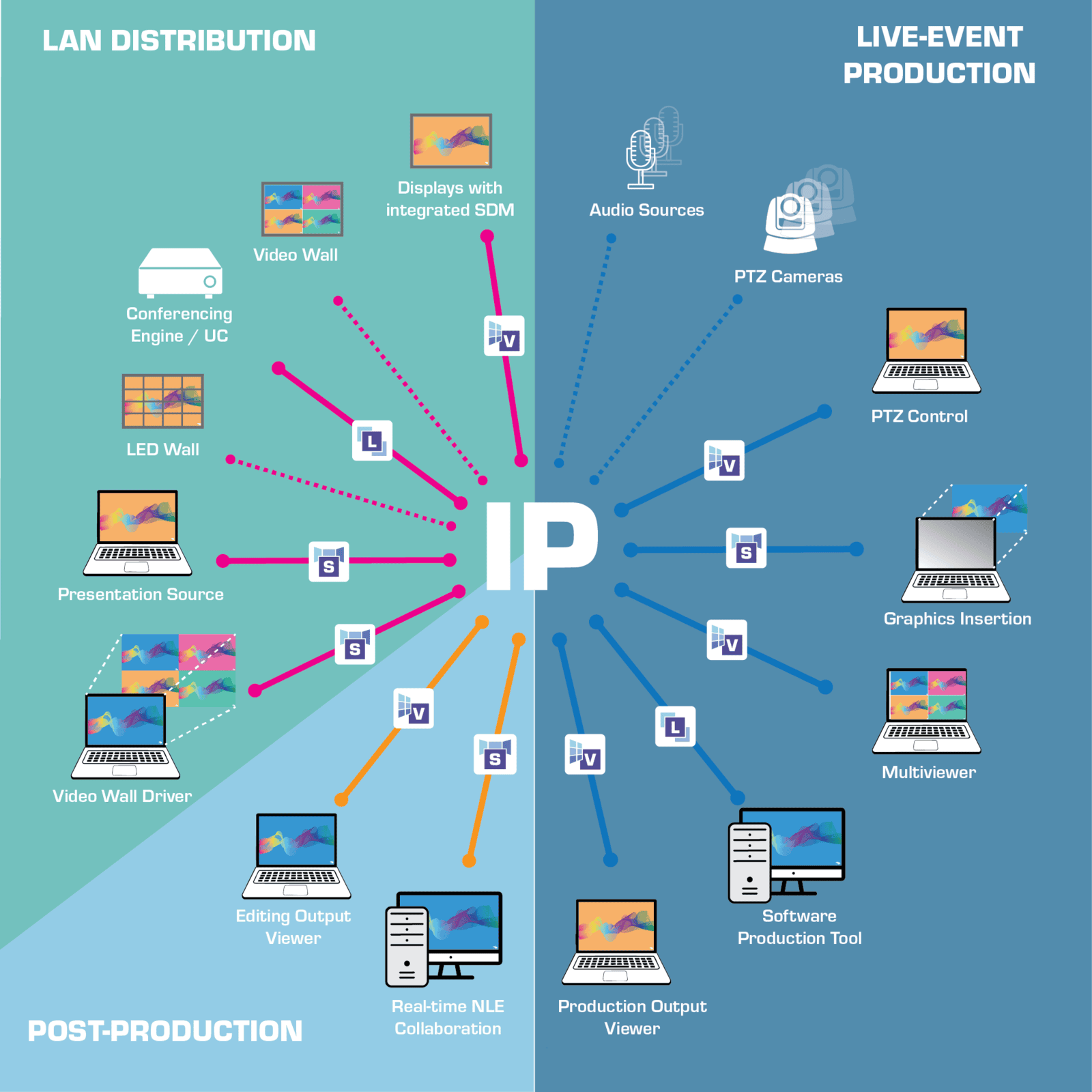
How the suite works together
One IP network. Three complementary apps.
Each app has a distinct role. Use them individually or combine for a complete end-to-end workflow.

TitaniumShow
IP source / sender
IP NETWORK
SMPTE 2110 / IPMX
1GbE standard switch
1GbE standard switch

TitaniumViewer
IP receiver / monitor
TitaniumDisplay
IP display endpoint with HDMI
(SDM or NUC)
(SDM or NUC)
TitaniumShow + TitaniumViewer are both included in the free 14-day trial — giving you a complete send-and-receive demo on two standard laptops.
The APPS
Choose the app and COTS that fit your role
Sender · Source
TitaniumShow
Cast your windows screen over SMPTE 2110 or IPMX instantly. Supports multi-screen output and NMOS registration.
Stream your Display or Virtual Screens – in a single click
Any Resolution, any Format – ideal for Broadcast and Pro-AV
Generate Audio and Video Test Patterns
Easy Setup and Control with NMOS. Plus powerful Options
Receiver · Monitor
TitaniumViewer
Receive and monitor up to 4x FHD or 1 4K60 streams on any Windows workstation.
Subscribe to one or multiple AV streams, in a single click with NMOS
Any Resolution, any Format – no delay, instant display
Overlays for real-time network statistics, right on screen
Effortless setup, advanced capabilities with built-in NMOS panel
TWO-WAY BRIDGE
TitaniumLink
Receive IP streams as virtual camera/audio in any tool, and send tool output back to the network as ST 2110 / IPMX.
In-and-Outs: network input and output to your applications
Suitable for many use-cases: Conferencing, Production, VJing…
True COTS approach: no need for capture cards / USB bridge
Effortless setup, advanced capabilities with built-in NMOS panel

Display endpoint · Intel SDM or NUC PC
TitaniumDisplay
Turn Intel® SDM-ready displays or regular displays into native IPMX / ST2110 endpoints. COTS-based hardware receiver.