




⏱ 5 min read
A Practical Look at Titanium Apps in ST 2110 Environments
A Practical Look at Titanium Apps in ST 2110 Environments
A broadcast studio rarely stands still. One day it’s a standard news rundown, the next it’s a special program, an extra guest, a remote contributor, or a last minute graphics requirement. Technically, the facility may already be fully IP, built around SMPTE ST 2110, allowing for such flexibility. Operationally, though, every change can still feel… heavy.
Spinning up new sources or adding monitoring positions often means new conversion hardware, new fiber, and time consuming setup. This is where the gap lies between the promise of IP and the reality of day to day studio operations.
Titanium Apps — joining together ST 2110, IPMX, JPEG XS & NMOS — were designed to close that gap, by enabling any IT hardware to operate as native ST 2110 endpoints — eliminating the need for dedicated capture cards, converters or specialized NICs.
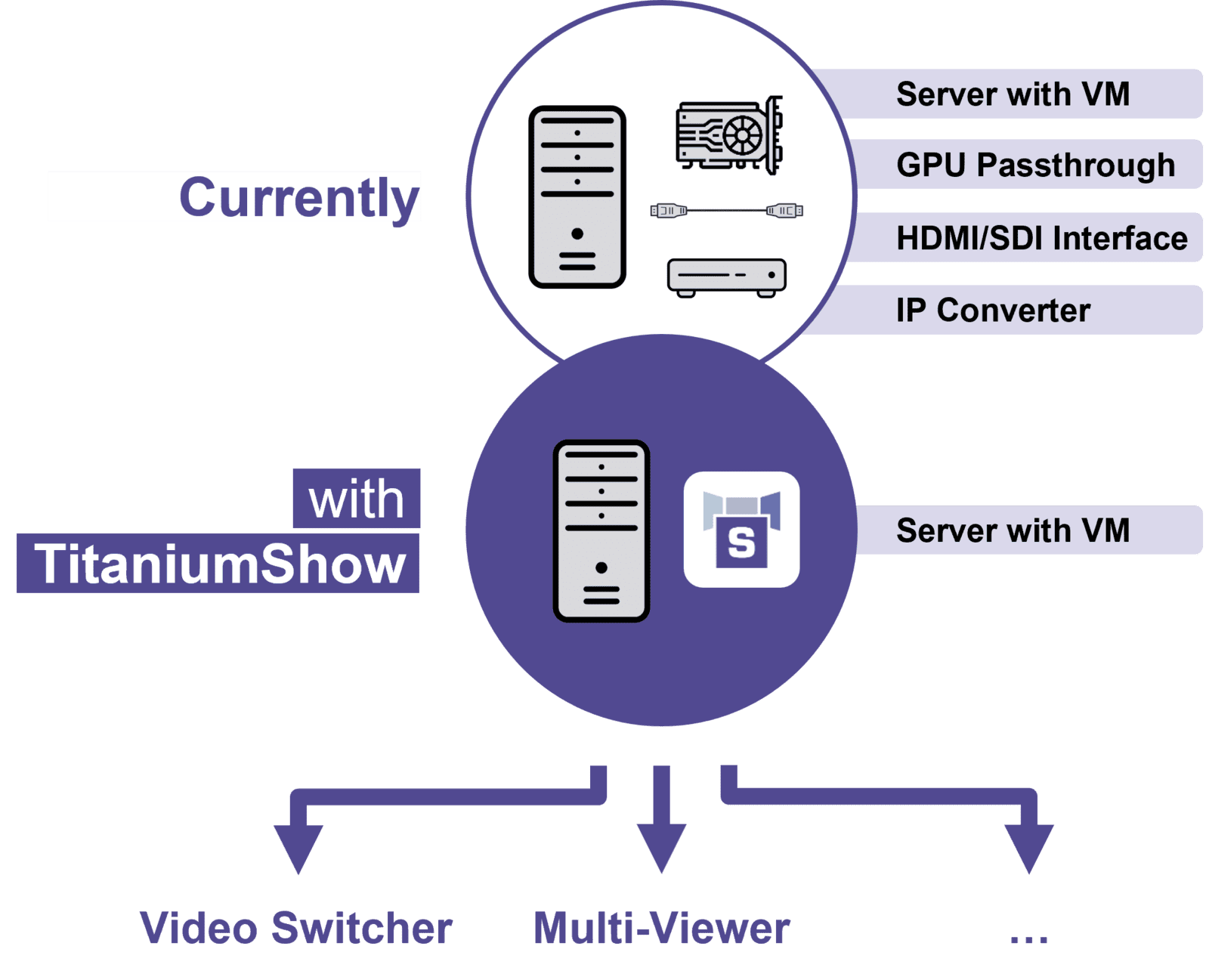
When Adding a ST 2110 Source No Longer Means Adding Gateways or Converters : TitaniumShow
Imagine a production that suddenly needs an extra video source: a browser window, a diagnostics view, or a social media input. Traditionally, that means provisioning a machine with GPU outputs, dealing with SDI, adding an IP converter, and validating the whole chain.
With TitaniumShow, that chain disappears. A standard workstation, laptop, or even a virtual machine can become a native ST 2110 source, through software alone. No GPU passthrough. No external converters. No specific NIC. No capture card. Just software running on existing infrastructure, that can easily be repurposed.
For broadcasters embracing virtualization, this is a natural evolution. Instead of waiting to source and integrate additional hardware, engineers simply allocate a new VM, deploy TitaniumShow, and the source is immediately available on the 2110 network and advertised via NMOS. Days become minutes.
Whether the feed ends up on air — for social media, presentation sharing, ... — or is only used internally — for diagnostics, web dashboards, or engineering scopes — the effort is the same. The studio gains capacity without gaining physical complexity.
When ST 2110 Monitoring Positions Become Temporary, Not Permanent : TitaniumViewer
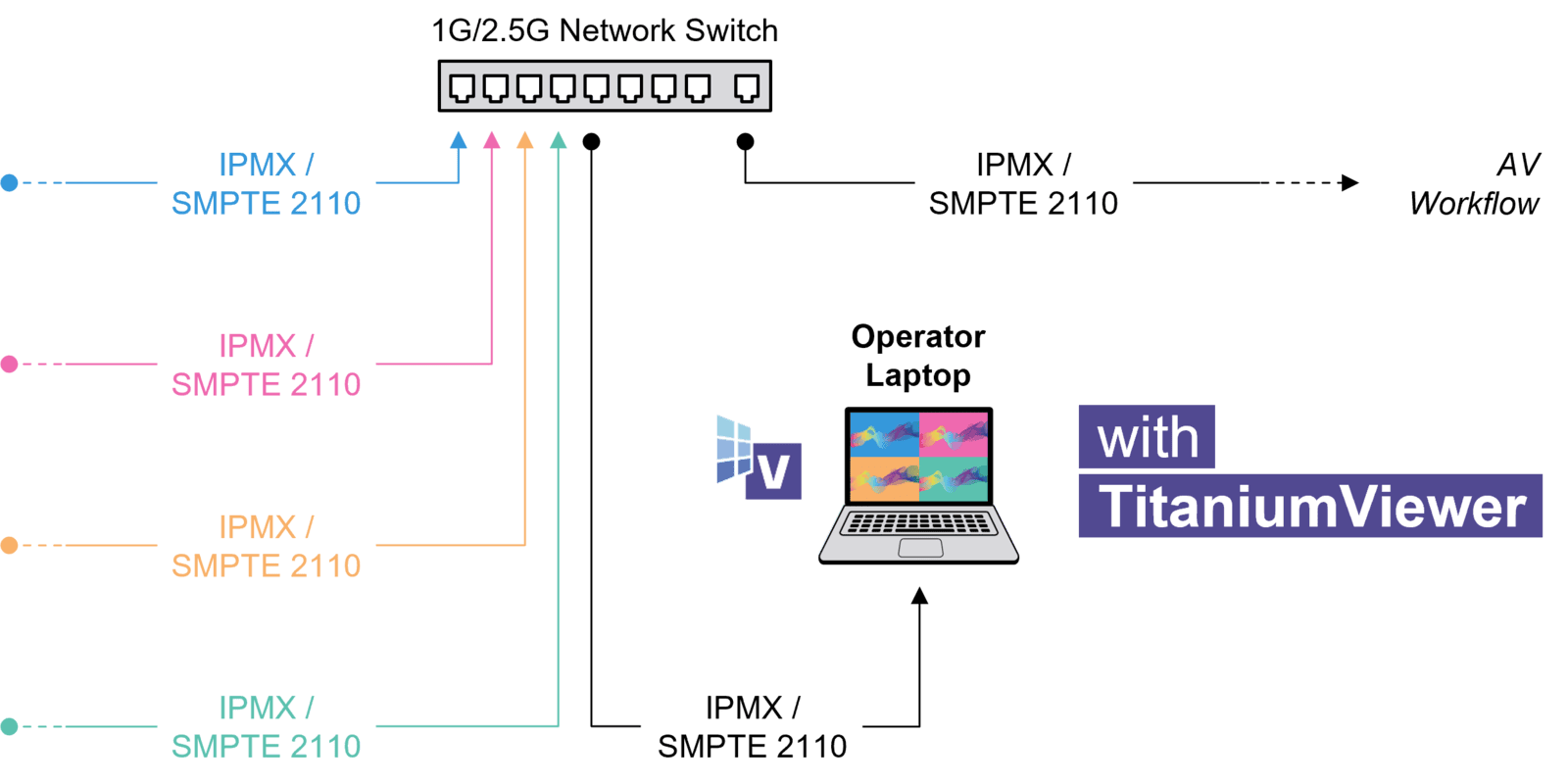
Studios rarely have a fixed number of viewers. One production needs an extra multiviewer, another adds a commentator or a backup operator, a third requires engineering monitoring. Yet adding a monitoring position can still require a dedicated ST 2110 receiver, new fiber, and permanent infrastructure changes — even if the setup is only needed for a few days.
TitaniumViewer shifts monitoring into software. Any laptop or workstation with an existing Ethernet connection can instantly discover and display ST 2110 or IPMX signals. No standalone IP converters. No new cabling runs.
This flexibility matters in real productions. A workstation used as a flexible multiviewer today can be repurposed tomorrow. Monitoring becomes elastic — added when needed and removed when it’s not — while remaining fully native to ST 2110 and NMOS workflows.
When ST 2110 Feeds Flow Directly into Software Production Tools : TitaniumLink
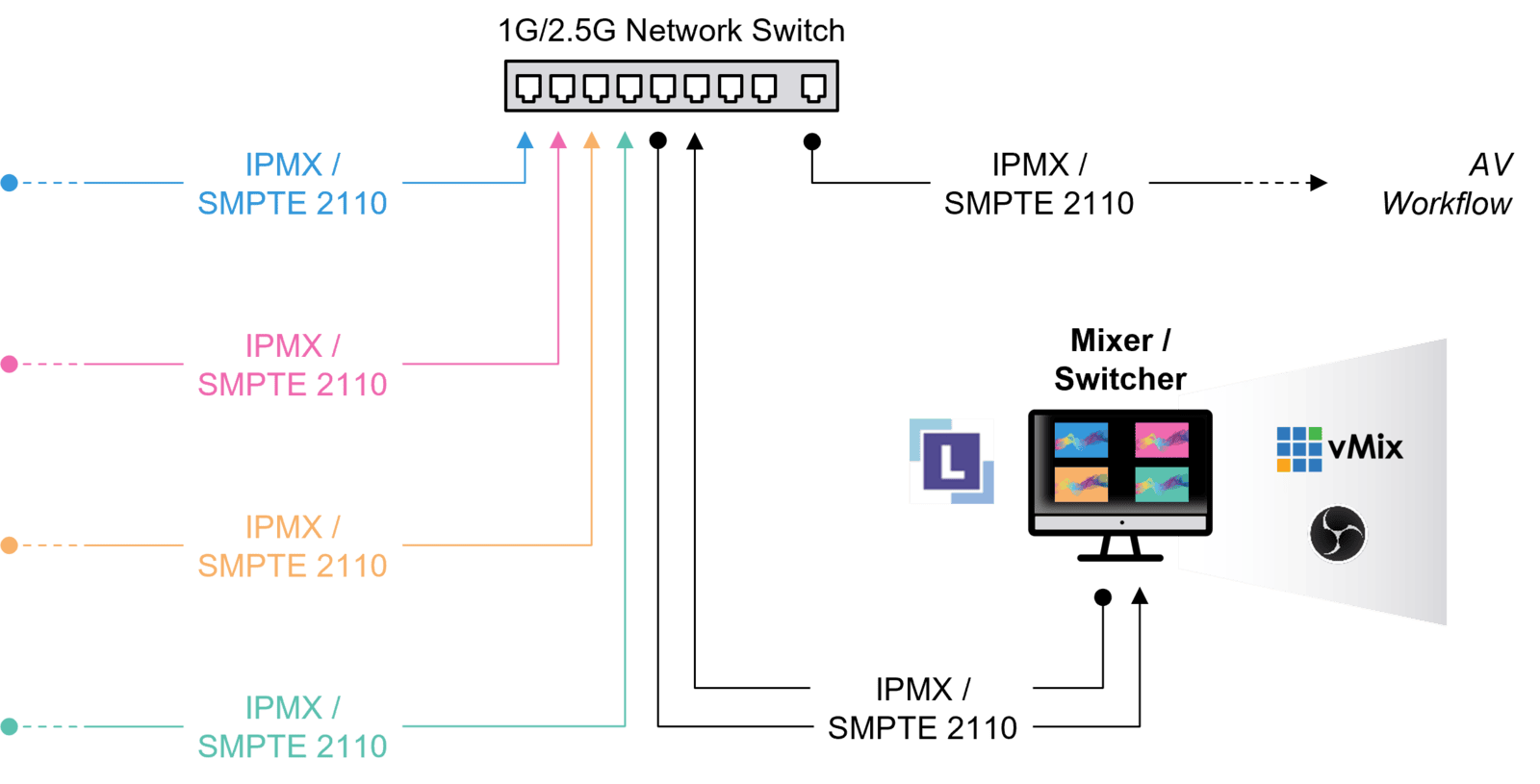
Modern broadcast studios increasingly rely on software-based tools: graphics engines, production switchers, conferencing platforms, creative applications. Yet, in these systems, ST 2110 signals often live on the “other side” of dedicated capture hardware.
TitaniumLink removes that boundary. It acts as a software bridge between ST 2110 streams and third party applications, letting live camera feeds appear directly inside production and graphics software — without IP capture cards.
This enables hybrid workflows that mix traditional live production with software creativity. Multiple camera angles can be switched in software. Live feeds can drive broadcast graphics directly. And all of it stays inside the IP domain, without adding PCIe cards or specialized adapters.
A More Agile Way to Scale IP Studios
Taken together, TitaniumShow and TitaniumViewer give studios flexibility at the edges: where change happens most often, and where time matters most.
Instead of asking “What hardware do we need?”, we can increasingly ask “Where do we run it?”
That shift is what turns SMPTE ST 2110 from a powerful transport standard into a truly agile production environment.

Want to see how software defined ST 2110 works in practice?
Try the Titanium Apps in your own environment or contact our team to discuss how they fit into your studio workflows.
관련 콘텐츠
Discover the new intoPIX Titanium software suite that provides a superior video experience with ultra-low latency, tailored for live event production and Professional AV distribution workflows. .
Discover the new intoPIX Titanium software suite that provides a superior video experience with ultra-low latency, tailored for live event production and Professional AV distribution workflows. .
intoPIX는 Pro-AV 애플리케이션에 힘을 실어주는 고유한 이미지 처리 및 압축 기술을 구축했습니다.
intoPIX는 Pro-AV 애플리케이션에 힘을 실어주는 고유한 이미지 처리 및 압축 기술을 구축했습니다.